Tom King, formerly with Macromedia, has created a Google Calendar for Elearning Events which he says he will keep up to date by emailing him at: events@mobilemind.net.
You can see the calendar for October Elearning Events. And Tom was nice enough to post my event in September.
Tuesday, 26 September 2006

Virtual Meeting - What's Next in eLearning - Wed, Sept 27, 4PM Pacific
I had mentioned this briefly, but someone reading my blog had just said they had not seen the announcement, so sorry for the late notice. I'm doing a virtual presentation tomorrow at 4PM Pacific (3:30 PM set up) on:
What's Next in eLearning
You can get information at:
http://home.vftraining.net/vft/astd/el092706.htm
It is being done for ASTD Los Angeles, but they said that its okay for others to register.
I will try to post a recording of the session (assuming its not horrible) in the next few days.
What's Next in eLearning
You can get information at:
http://home.vftraining.net/vft/astd/el092706.htm
It is being done for ASTD Los Angeles, but they said that its okay for others to register.
I will try to post a recording of the session (assuming its not horrible) in the next few days.
Monday, 25 September 2006
Is Gagne Relevant for eLearning Courseware Design?
There's an interesting discussion sparked by Donald Clark's - Gagne's Nine Dull Commandments. His basic point is that Gagne's:
I personally am a big fan of a model where you accomplish 1-3 by challenging the learner with an example that leads to the primary questions you are trying to answer with the course. Let's take his example: Sexual Harassment Training...
The example would be something that is a borderline behavior (someone talking about the Janet Jackson superbowl incident, a joke being discussed between colleagues, dating a co-worker when its not boss/subordinate) that should be seen as true to life, the characters should be sympathetic (not an obvious harasser) and it should lead us right to the key questions: Is this inappropriate? How do you determine that? What should you do if you have a question? What is the impact on you if you are involved? What is the impact on you even if you aren't involved?
Generally, this accomplishes 1-3 and hopefully you can lead the person through the example to all of the key questions (objectives) through the example. Sometimes you need to embellish this. Note: I personally try to avoid putting the learning objectives straight into the course. The language of learning objectives and the language you use when interacting with a student is different.
Okay, continuing the example, let's be a little creative about how to present the content. We don't just want to present a bunch of information and have them read it. Let's continue the example that we set up and have the person in the story learn (along with us) how they should handle the situation. Have them find out (maybe in discussion with someone from HR) what the four factors are that can be used to determine harassment. It's going to cover the exact same thing, but you are doing it via a story and just changing language. Sometimes you need to stretch a bit or take the learner out of the story with some notes to cover additional material, but they are at least engaged.
Now for testing - unfortunately for a topic like the four factors that determine harassment, you are probably going to want to use a multiple choice question. I would argue that asking that via multiple-choice is going to be fine for the learner in this case (especially since you didn't hit them over the head with "learn this" in the first place). Definitely you should be able to set up scenarios and allow them to try-out different answers and see the result. Or test the user via a multiple-choice - what should you do in this scenario. Of course with a compliance topic, you are often limited on how gray you can make the examples - especially during testing.
Finally, as for follow-up, we have so much more opportunity these days. With sexual harassment as the topic, it may be a bit harder to do follow-up because you are trying to get people not to do something. I prefer to check in and see if they are doing something. But, wait, maybe we can convince the compliance office to allow us to ask learners if they've noticed any questionable behavior (which is actually one of the goals of more enlightened compliance programs - they do want reporting of possible incidents)? How about a nice short follow-up storyline-based piece that you can remind the user of the importance of the topic and maybe teach them something more? Even a reminder email from the compliance office is better than nothing. Sure, all the user may do is delete it - but give it a good subject line that at least puts the thought in their head for about two seconds. We certainly will provide additional content via eLearning in another year or two to help follow-up on it. Normally I also want to try to engage with managers who are involved in the overall performance initiative, but with the topic of sexual harassment, I'm worried that they would blow it off completely (what's in it for them).
What's my point with all of this? As instructional designers, we need to use models like Gange, but we also need to be creative. It takes me five seconds to add a little extra cheese and garlic salt to my kids Kraft Mac-n-Cheese, but man does the extra stuff make all the difference in the experience.
- Gaining attention
- Stating the objective
- Stimulating recall of prior learning
- Presenting the stimulus
- Providing learning guidance
- Eliciting performance
- Providing feedback
- Assessing performance
- Enhancing retention and transfer to other contexts
is in his words ...
His examples unfortunately hit a little too close to the mark for many of the courses that are built out there:an instructional ladder that leads straight to Dullsville
I completely understand his point about the misapplication of this model and the fact that applying it without some creativity leads to boring courseware. But, let's not throw this away as irrelevant quite so quickly.1 Gaining attention
Normally an over long Flash animation or corporate intro, rarely an engaging interactive event.
2 Stating the objective
Now bore the learner stupid with a list of learning objectives (really trainerspeak). Give the plot away and remind them of how really boring this course is going to be.
3 Stimulating recall of prior learning
Can you think of the last time you sexually harassed someone?
4 Presenting the stimulus
Is this a behaviourist I see before me?
5 Providing learning guidance
We've finally got to some content.
6 Eliciting performance
Multiple-choice questions each with at least one really stupid option.
7 Providing feedback
Yes/no, right/wrong, correct/incorrect try again.
8 Assessing performance
Use your short-term memory to choose options in the multiple-choice quiz.
9 Enhancing retention and transfer to other contexts
Never happens! The course ends here, you're on your own mate.
I personally am a big fan of a model where you accomplish 1-3 by challenging the learner with an example that leads to the primary questions you are trying to answer with the course. Let's take his example: Sexual Harassment Training...
The example would be something that is a borderline behavior (someone talking about the Janet Jackson superbowl incident, a joke being discussed between colleagues, dating a co-worker when its not boss/subordinate) that should be seen as true to life, the characters should be sympathetic (not an obvious harasser) and it should lead us right to the key questions: Is this inappropriate? How do you determine that? What should you do if you have a question? What is the impact on you if you are involved? What is the impact on you even if you aren't involved?
Generally, this accomplishes 1-3 and hopefully you can lead the person through the example to all of the key questions (objectives) through the example. Sometimes you need to embellish this. Note: I personally try to avoid putting the learning objectives straight into the course. The language of learning objectives and the language you use when interacting with a student is different.
Okay, continuing the example, let's be a little creative about how to present the content. We don't just want to present a bunch of information and have them read it. Let's continue the example that we set up and have the person in the story learn (along with us) how they should handle the situation. Have them find out (maybe in discussion with someone from HR) what the four factors are that can be used to determine harassment. It's going to cover the exact same thing, but you are doing it via a story and just changing language. Sometimes you need to stretch a bit or take the learner out of the story with some notes to cover additional material, but they are at least engaged.
Now for testing - unfortunately for a topic like the four factors that determine harassment, you are probably going to want to use a multiple choice question. I would argue that asking that via multiple-choice is going to be fine for the learner in this case (especially since you didn't hit them over the head with "learn this" in the first place). Definitely you should be able to set up scenarios and allow them to try-out different answers and see the result. Or test the user via a multiple-choice - what should you do in this scenario. Of course with a compliance topic, you are often limited on how gray you can make the examples - especially during testing.
Finally, as for follow-up, we have so much more opportunity these days. With sexual harassment as the topic, it may be a bit harder to do follow-up because you are trying to get people not to do something. I prefer to check in and see if they are doing something. But, wait, maybe we can convince the compliance office to allow us to ask learners if they've noticed any questionable behavior (which is actually one of the goals of more enlightened compliance programs - they do want reporting of possible incidents)? How about a nice short follow-up storyline-based piece that you can remind the user of the importance of the topic and maybe teach them something more? Even a reminder email from the compliance office is better than nothing. Sure, all the user may do is delete it - but give it a good subject line that at least puts the thought in their head for about two seconds. We certainly will provide additional content via eLearning in another year or two to help follow-up on it. Normally I also want to try to engage with managers who are involved in the overall performance initiative, but with the topic of sexual harassment, I'm worried that they would blow it off completely (what's in it for them).
What's my point with all of this? As instructional designers, we need to use models like Gange, but we also need to be creative. It takes me five seconds to add a little extra cheese and garlic salt to my kids Kraft Mac-n-Cheese, but man does the extra stuff make all the difference in the experience.
Friday, 22 September 2006
Adoption of Web 2.0 and eLearning 2.0 Revisited
A consistent pattern in our response to new technologies is we simultaneously overestimate the short-term impact and underestimate the long-term impact.
- Roy Amara of the Institute for the Future.
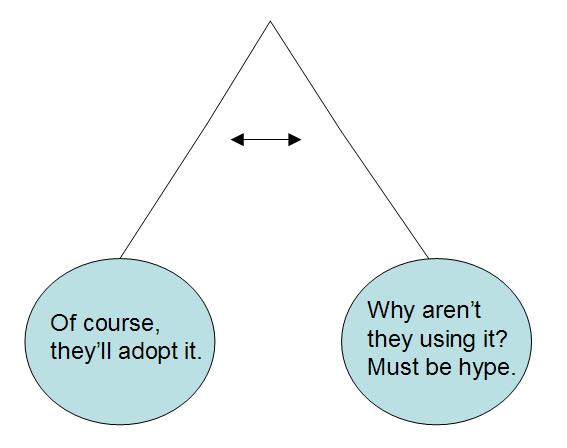 I have (and I believe that it's common) a natural tendency when looking at new technologies to swing back-and-forth between believing they are the best thing since sliced bread, trying something with the tool, running into barriers to adoption, feeling like they'll never get adopted. In response to my post Personal and Group Learning Using Web 2.0 and my post on eLearning 1.0, eLearning 1.3 and eLearning 2.0, I got asked about adoption. Will people really use this stuff?
To add to the mix, there's some very interesting discussion going on out of an experiment by David Pollard where he offered to collaboratively edit a document on why collaboration tools are underused. In the responses (Shawn, Wendy) and in the result and in comments around all of this stuff, you can see a myriad of barriers to adoption of collaboration tools. The irony of collaboration around why collaboration tools are underused is undoubtedly not lost by everyone.
But, this discussion is not limited to folks in the learning / eLearning world. In prior posts (Enterprise 2.0 - What's the PU? & Web 2.0 Adoption in the Enterprise - It's Personal) I provided links to lots of posts discussing adoption issues that come from slightly different context. My contention is that the same old technology adoption model holds:
Adoption Rate = Perceived Usefulness (PU) * Perceive Ease of Use
(PEOU)
And with how easy these new tools are, the PEOU is going to be high. So, it will come down to their Perceived Usefulness (PU). But, ...
It's first and foremost about personal value.
Banking adoption on value to the department, value to the enterprise, value to the group, those are all hard sells. Thus, getting adoption of a new tool whose primary value is "collaboration" is a tough sell unless that collaboration has obvious, immediate value to the individual.
Now, while my personal pendulum swings back-and-forth around adoption of approaches that I describe in Personal Learning for Learning Professionals - Using Web 2.0 Tools to Make Reading & Research More Effective and Personal and Group Learning Using Web 2.0 Tools, I actually think we are seeing tools that will slowly gain traction in the enterprise.
Thursday, 21 September 2006
Personal and Group Learning Using Web 2.0 Tools
In my previous post, I examined Personal Learning for Learning Professionals - Using Web 2.0 Tools to Make Reading & Research More Effective. That post focused primarily on how Social Bookmarking tools such as del.icio.us or Yahoo My Web can be used as part of Personal Learning. In this post, I want to focus on a specific scenario that involves Personal and Group Learning and how Web 2.0 tools apply to this need.
Scenario – a learning development department in a mid size corporation has five staff members. They want to define an eLearning strategy that will look at (a) the business needs of their company and internal clients, (b) their performance and learning needs, (c) their learning strategies, and (d) what they need to do from a services, technology, process and people perspective to support this strategy. They will be creating this strategy over the next few months and have many strong feelings among the group about different things they can and should be doing. The strategy will ultimately be presented as part of the fall planning cycle and be used as part of budget justification. It will also be used to help communicate with internal clients about the services they provide and how they can work with these clients. They also want what they define in the strategy today to live on and evolve over time. In order to accomplish this, they need to learn quite a bit about where things are today in their business and in eLearning and where they are going in the future.
Hopefully this scenario sounds familiar to many people. Now let’s focus on how several Web 2.0 tools could be used as part of a system that would support them in this challenge.
For this scenario, I’ve chosen tools that (a) I’m most familiar with, (b) are provide as Software Services, (c) are free – a big part of the reason I’m familiar with them. :) The tools are:
- PBwiki – www.pbwiki.com
See also – Comparison of Wiki Software - Yahoo My Web – myweb.yahoo.com
See also – Social Bookmarking Face-Off
Yahoo MyWeb better than del.icio.us, rollyo, et.al. for Personal / Group Learning - Bloglines – www.bloglines.com
See also – List of Aggregators - Blogger – www.blogger.com
See also – Blog Software
I’m also making an important early decision about what and how much we will share publicly vs. keep internal. We will keep all content on PBwiki internal only. We will intentionally make our Blogger conversations and Yahoo My Web links public. Of course, links to internal PBwiki pages can be seen but not accessed. It will be important for all staff members to keep this in mind as they use the systems.
To get this going, the department selects one person (who likes playing with systems) to first go through and set things up for themselves. They will help make it happen for the rest of department. Overall, the set up steps are:
- Create one PBWiki account with appropriate settings and they will use a single shared password – but changes will be tracked back to the individual. Initially only simple edits to the home page are made.
- Each person on the team creates a Blogger blog account
- Each person registers their blog on Technorati. I would recommend that you have one of the more technical person on the staff help make this happen.
- One person creates their blogline account and subcribes to (a) RSS feed from PB Wiki, (b) various eLearning Blogs, (c) all Blogger blogs from department. Finally, the technical person will provide the OPML link from bloglines and put it on the Wiki with instructions how to import it so that everyone else can import the same subscriptions.
- Each other person in the department creates a blogline account and imports the OPML so they are automatically subscribed to the same blogs
- Each person in the department signs up on Yahoo MyWeb. This includes downloading and installing the Yahoo Toolbar which won’t work in some corporate environments. Consider del.icio.us in these environments. Add each other member of the department as "contacts" in Yahoo MyWeb.
Now let’s consider what happens after things are set up. As part of an initial brainstorming discussion, it becomes clear that the business wants to be able to create quick hit eLearning pieces on their own with little to no involvement of the learning department, i.e., they need some kind of rapid eLearning tool that can be used by SMEs. The expectation is that some of the content will be sent around via email and sometimes it will include a brief quiz and they’ll want it tracked under the LMS. The department needs to figure out:
- What do they need to provide to support this? What are the service offerings? How will it work?
- What tools will work?
- What do they need to do now to be prepared?
Again, hopefully this sounds familiar. Let’s look at some of the things that happen out of the meeting using the tools that were set up previously.
- One of the people on the team creates a page in the Wiki on Rapid eLearning. They put a quick note on the page to ask that everyone uses the tag “rapid” on things that relate to this topic. They go to Yahoo MyWeb and create a Web Badge that will show all recent links to pages tagged with “rapid.” They embed this on this Wiki page. The assumption is that over time, some of these dynamic links from the Web Badge will be copied and made permanent on the Wiki.
- Each of the members also should add a subscription in bloglines to Yahoo MyWeb tag “rapid”. You do this by going to MyWeb and doing the appropriate tag search and then grabbing the RSS link at the bottom of the page.
- The first task is to try to define the requirements, so a couple of the people in the department start searching for related content (in another post I’ll talk about how Web 2.0 tools might help you find better content).
- Each time they find an interesting page, they save it to My Web and tag it with “rapid” and sometimes add notes that the other members will see along with the link.
They also copy and paste into the Wiki as the find interesting possible requirements. - As they run into interesting issues (challenges, questions) around the requirements, they create blog posts. These are public so they get comments or feedback from other members in the department, but occasionally they get feedback from people working on similar issues or with relevant experience.
- Once they feel they have a good list of requirements, they post it again as a blog post and ask for anything they’ve possibly missed that was important.
Again, no doubt a lot of this process will sound familiar and will be only slightly different than what you already would do when you face this learning / work challenge. That’s a good thing. But let’s consider what’s happened here that’s a little different:
- You have collected links that are:
- Easily shared between your group members (as easy as saving a favorite today)
- Full-text searchable for everyone in your group
- Published via RSS out to the group so they can see what’s going on
- Available from any computer
- You have a collaborative editing location in the Wiki that can be shared with internal clients at an appropriate point
- No need to shuttle around word documents with version numbers
- No need to figure out how to post on your intranet
- You may have receive outside feedback / input on what you are doing
- You haven’t added one additional email unless you really wanted to send an email to the group
Finally, there’s an important side note here. As part of your eLearning Strategy development, you should be learning how to use these tools to figure out if they should be part of your eLearning Strategy…
Let me know what you think. Are you going to try it? If so, please blog about your results. If not, why not? If you find good resources that give more detailed instructions or have problems, also let me know.
Wednesday, 20 September 2006
Decline in attendence puzzles professors
Found via Online Learning Update - Decline in attendance puzzles professors - Matt Krupnick, the Telescope. Interesting piece that addresses something I've wondered about for a while. If it's a class with 700 studens and pure lecutre, and you have a taped lectured and notes on the web, why bother going to the live class? Especially if you can play back the lecture in a fast-forward mode (one of the coolest features out there). Of course, what you also soon realize is that going through a long taped lecture isn't all that great - what you really want is the transcription.
And, if you have the taped lecture and the notes, why bother doing a new lecture again the next year?
It does raise some very interesting questions!
Blogs and Community
I just read Nancy White's Blogs and Community – launching a new paradigm for online community? Truly a great article on how blogs build community. Her description of a topic centric community really helps you to think about the loose community network that gets created by blogs. The article also pointed me to a couple of interesting related pieces:
What's Better to Build Community: Blogs or Forums? - Compares conversation in blog world vs. forums. What struck me was:
- In general, blogs are great at connecting and bridging to a NEW community.
- In general, forums are great at harnessing and growing an EXISTING community.
Put in a different way, blogs allow us to grow a community without going to a single location. A forum or mailing list is most effective if everyone agrees to go to that single location and abide by those norms. Blogs allow community to be formed based on common interests and the community grows and evolves in a very fluid manner.
It's an interesting time right now as I'm beginning to see many more blogs with authors talking about eLearning and slowly a community (a very fluid community) is growing.
Subscribe to:
Posts (Atom)

